In short
- Airpost Order Link sends every paid Shopify order to a verified person who holds a batch of your stock at home in your customer’s country. Fulfilment of a small parcel costs about €3.10 plus the carrier rate, with no warehouse, subscription or minimum volume.
- Connecting is one eight-character code shown inside the app, valid for 15 minutes. No API keys, no store URL, no webhook to configure.
- An order can go to one sender or be offered to every sender in a country who has the stock; the first to accept ships it. That is how you cover holidays and volume without a second contract.
- You set a default shipping method once per product and per destination country. Without a default, the order waits for you instead of shipping itself.
- That €3.10 is the sender’s fee (a guide of €2.25 for a small parcel) plus a €0.85 platform fee. Storage, set-up and minimum: none.
- The app is in the Shopify App Store: install Airpost Order Link there, create an AirPost account and connect the store with the code.
- AirPost is a peer-to-peer fulfilment network: online shops have their orders packed and dropped at a parcel point by verified people near their customers, who earn a fee per parcel from home. No warehouse, no minimum order volume.
Most Shopify fulfilment apps are a front door to a warehouse. The app is free; the building behind it is where the storage fee, the receiving fee and the minimum monthly volume live. If you sell a few hundred orders a month across three countries, you already know how that conversation ends.
This article is about a Shopify app with no building behind it. Your stock sits in batches with verified people in the countries you sell into, each paid order is routed to one of them automatically, and the label, fulfilment and tracking come back into Shopify without you touching the order.
We build that app, so read the middle sections as a description and the last two as the part you should actually test us on: what it costs, and what it does not do.
Status: in the Shopify App Store
Airpost Order Link is in the Shopify App Store: install it there, create an AirPost account and connect the store with the code. Everything below describes how the connection works today.
Is there a Shopify fulfilment app that works without a warehouse?
Yes. Airpost Order Link routes each paid order to a verified person who holds a batch of your stock at home in your customer’s country, for about €3.10 per small parcel plus the label, with no storage fee or minimum; you install it from the Shopify App Store. The alternatives are print-on-demand and dropshipping apps, where the supplier holds and ships the goods, or shipping from your own shelf with a label app.
Which fits depends on who holds the stock. With print-on-demand or dropshipping you hold none, but you do not control the product or the packing. From your own shelf you control everything and pay in hours. The rest of this article is about the option in between.
How does an order travel from Shopify to a parcel point?
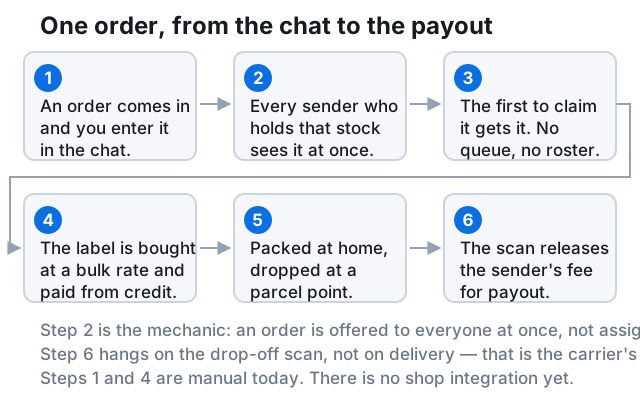
Shopify reports a paid order
The app listens for orders that are paid, not for orders that are placed. An unpaid or cancelled checkout never reaches a sender, and a test store is skipped by default until you ask support to switch test orders on.
The items are matched on SKU
You pulled your catalogue into AirPost once — name, SKU, weight and price per variant. The order’s line items are matched on SKU, and the weight decides which carrier rate applies. A variant without a SKU cannot be matched, so it is skipped and flagged in the log.
A sender is chosen, or several are offered
The app looks at who holds those items in the destination country. If you configured one sender, the order goes to them. If you configured several, every one of them sees the offer at the same time and the first to accept ships it; the others see that it has gone.
The default shipping method is applied
For this product and this country you chose a service once: pick-up point or home delivery, standard or express. The order carries that choice. Where no default exists the order is created but waits for you to complete it by hand.
The sender packs and buys the label
The label is bought at the network rate and paid from your AirPost balance. The sender prints it, packs the order from the stock on their shelf and drops it at a parcel point on a trip they were making anyway.
Shopify is fulfilled with tracking
The moment the label exists, the order is marked fulfilled in Shopify with the tracking number, and Shopify sends your customer its normal shipping confirmation. Cancel in Shopify before the carrier scans the label and the order stops on our side too, with the shipping cost returned to your balance.
One sender or many: how routing works
A warehouse has one address, so a Shopify fulfilment app for a warehouse has one routing rule: send everything there. A network of individuals has a different problem and a different opportunity. People go on holiday, and people have shelves of different sizes.
Routing follows from how many senders you tick when you set up the product and country. One tick is manual routing: that person gets every order for that product in that country. Two or more ticks is a broadcast: the order is offered to all of them at once, the first to accept takes it, and the address is only revealed to the one who accepted.
| One sender | Several senders (broadcast) | |
|---|---|---|
| Who gets the order | Always the same person | Whoever accepts first |
| If they are away | The order waits for you | Someone else accepts it |
| Stock you need | One batch | A batch with each sender |
| Predictability | High — one relationship | Lower — the packer varies per order |
| What you see | The order in that sender’s chat | The order, and who took it |
| Fits | One product, one steady partner | Volume, holidays, several products |
An offer does not stay open forever. If nobody accepts within 24 hours it expires and comes back to you, and you can withdraw an order yourself as long as no one has taken it. A sender can also decline, which sends it back the same way.
Where can the parcel start?
The point of holding stock in the customer’s country is that the parcel becomes a domestic one: cheaper, faster, and with no customs step. That only works where a domestic service exists at a price a shop will pay. These are the countries with one today, read from the live rate card rather than typed here:
- Austria
- Belgium
- Canada
- Croatia
- Czechia
- Denmark
- Estonia
- Finland
- France
- Germany
- Hungary
- Ireland
- Italy
- Latvia
- Lithuania
- Netherlands
- Norway
- Poland
- Portugal
- Romania
- Slovakia
- Slovenia
- Spain
- Sweden
- United Kingdom
- United States
Your Shopify store can be anywhere. What matters is where your senders are. A British store holding stock with a sender in Germany ships German domestic parcels to German customers, and the bulk shipment into that stock is the only thing that crosses a border.
What that difference is worth per parcel — carrier rate, customs handling and the duty per product type since July 2026 — is worked through in how to ship domestically in Europe without a warehouse. The countries and their rates are on /en/countries.
What does it cost per order?
| Item | What it is | Amount |
|---|---|---|
| Carrier rate | The label, bought at network rates | By size and country |
| Sender’s fee | What the person packing earns; set by them per parcel size | Guide €1.50 – €5.50 |
| Platform fee | Ours. Flat, every parcel size | €0.85 |
| Storage | No warehouse | None |
| Set-up, integration | The app is free; connection is one code | None |
| Minimum volume | No monthly floor, no minimum invoice | None |
The number does not move with volume, and that cuts both ways. €3.10 at ten orders a month is a bargain against a warehouse quote; €3.10 at eight hundred is not, because by then the warehouse has spread its fixed costs thin. Put your own quote next to it:
Compare with your own quote
With a 3PL
€3.95
Per order
€395 a month
With AirPost
€3.10
Per order
€2.25 sender fee + €0.85 platform fee, at any volume
€0.85 per order cheaper here.
| Orders per month | With a 3PL | With AirPost |
|---|---|---|
| 25 | €8.30 | €3.10 |
| 50 | €5.40 | €3.10 |
| 100 | €3.95 | €3.10 |
| 250 | €3.08 | €3.10 |
| 500 | €2.79 | €3.10 |
| 1000 | €2.65 | €3.10 |
Set-up cost spread over twelve months. Excludes carrier rates, returns and VAT.
Current rates by country are on /en/pricing. The model itself — what it is, how it differs from a 3PL and from dropshipping, and where it breaks — is defined in what is peer-to-peer fulfilment; the full offer for shops is on local fulfilment in Europe.
What the app does not do
- Route every paid order to the sender who holds the items, or offer it to several at once.
- Buy the label, fulfil the order in Shopify and pass the tracking number to your customer.
- Honour cancellations made in Shopify while the parcel has not been scanned.
- Sync inventory. Which batch sits with which sender is something you record; the app does not write stock levels back to Shopify.
- Handle returns. A return is a conversation with your sender, not a button.
- Replace a warehouse for bulky, chilled, regulated or wide-catalogue goods. Those need a building with the right permits.
- Connect other platforms. There is no WooCommerce, Amazon or bol integration; ask support if you run something else.
Stock in someone’s home is stock in someone’s home
Verification and stock records reduce the chance of the wrong person holding your goods. They do not insure them. Start with a batch you could write off, and check whether your business insurance covers stock held off your premises.
How do you test it without moving your whole store?
- Pick one product and the country where you have the most orders after your own.
- Write down what an order costs you today: label rate plus your packing time at a rate you would pay someone.
- Connect the store, pull the catalogue, and send one batch — about a month of orders — to one sender there.
- Set the default shipping method for that product and country, and leave everything else in your store unchanged.
- After a month compare four numbers: cost per order, transit time, your own hours, and the return rate.
- If it worked, add a second sender in the same country and switch that product to broadcast before you add a second product.
Frequently asked questions
Is there a Shopify fulfilment app that works without a warehouse?
Yes. Airpost Order Link sends each paid order to a verified person holding your stock at home in the customer’s country, for about €3.10 per small parcel plus the label, with no storage fee or minimum. Alternatives: print-on-demand or dropshipping apps, or shipping from your own shelf.
How does the app connect to my store?
With one code. The app shows an eight-character code in your Shopify admin, valid for fifteen minutes; you enter it on AirPost under Shop → Integrations. No API keys and no webhook configuration.
Can one order be offered to several senders?
Yes. Tick more than one sender for a product and country and every paid order for it is offered to all of them at once. The first to accept ships it; the address is only shown to that person.
What happens if no sender accepts?
After 24 hours the offer expires and the order comes back to you, unshipped. You can offer it again, pick a specific sender, or complete it by hand.
What does the app cost?
Nothing. You pay per shipment: the carrier rate, the sender’s fee and a €0.85 platform fee, from your AirPost balance. There is no subscription through Shopify Billing.
Is it in the Shopify App Store?
Yes. Install Airpost Order Link from the Shopify App Store, then connect the store with the code after you create an AirPost account.
Sources
A fulfilment app is only as good as the building behind it. This one has no building, which is the whole reason it has no minimum.
See how the connection works and what you need before the first order
Airpost Order Link for Shopify